Why Facebook Ad Accounts Get Restricted in 2026 — and How to Reduce the Risk
Facebook ads are still one of the most powerful traffic sources for affiliate marketers, e-commerce brands, local businesses, and performance teams. But in 2026, running campaigns on Meta is no longer just about finding a good creative and launching it fast. The platform pays close attention to account behavior, payment history, ad claims, landing pages, and the overall trust level of the advertiser.
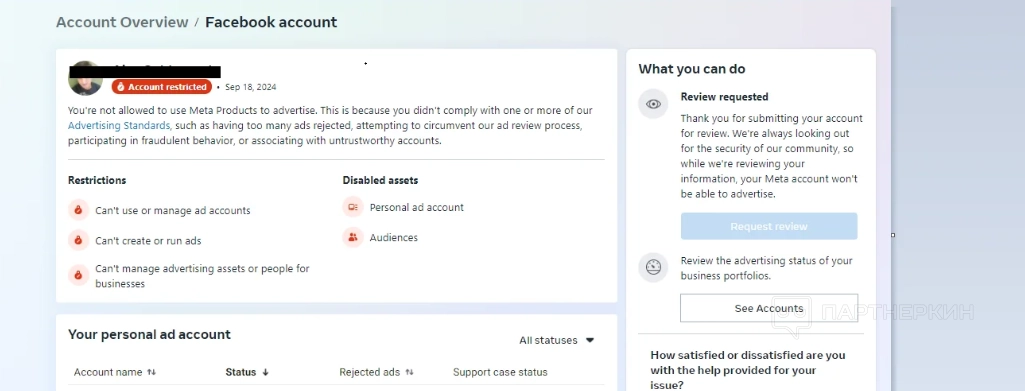
Many advertisers call every restriction a “Facebook ban,” but in reality, different problems need different solutions. A rejected ad, a disabled ad account, a restricted Business Manager, a blocked payment method, and a page-level limitation are not the same thing.
This guide explains why Facebook ad accounts get restricted, how to diagnose the problem, and what to do before launching campaigns again. The focus is not on risky tricks or moderation evasion. The goal is to build a safer advertising setup that can survive Meta’s stricter review systems in 2026.
Facebook Bans Are Usually a Signal, Not a Random Event
A restriction may look sudden, but it is often the result of several weak signals adding up. Meta may detect that something about the advertiser looks risky: a new account spending too fast, a suspicious payment method, aggressive ad copy, a landing page that does not match the ad, or repeated rejected campaigns.
For beginners, the most important idea is simple: Meta does not evaluate only the ad itself. It also evaluates the environment around the ad.
That environment includes:
-
the Facebook profile connected to the ad account;
-
the Business Manager history;
-
the page or Instagram account used for advertising;
-
the payment method;
-
the domain and landing page;
-
previous policy violations;
-
sudden changes in location, device, budget, or behavior.
In 2026, successful media buying is less about “how to bypass a ban” and more about how to avoid looking like a high-risk advertiser in the first place.
The 3 Main Reasons Meta Restricts Advertisers
Most Facebook ad restrictions can be grouped into three categories: policy risk, trust risk, and payment risk. Understanding the difference helps you avoid wasting time on the wrong solution.
1. Policy Risk: The Ad or Offer Breaks the Rules
Policy-related bans happen when the creative, copy, landing page, or offer conflicts with Meta Advertising Standards. Common triggers include misleading claims, prohibited products, exaggerated promises, before-and-after manipulation, sensitive personal attributes, or unclear business models.
Examples of risky ad angles include:
-
“You are overweight because of this mistake”;
-
“Doctors hate this secret method”;
-
“Earn $500 per day with no experience”;
-
fake urgency or fake scarcity;
-
miracle health, finance, or beauty claims;
-
ads that imply the user has a disease, debt, addiction, insecurity, or personal problem.
The practical fix is not just replacing one banned word. Meta reviews meaning, context, visual cues, landing page content, and user experience. A softer, more neutral creative often works better than aggressive copy that directly attacks the user’s pain point.
Instead of saying: “Are you struggling with bad skin?”
Use: “A simple skincare routine for people exploring gentler daily care.”
The second version avoids directly assigning a personal attribute to the viewer.
2. Trust Risk: The Account Looks Unstable or Artificial
Even if your offer is legal, Meta may restrict advertising access when the account behavior looks suspicious. This is common with new ad accounts, fresh Business Managers, recently added admins, new domains, or sudden budget jumps.
Typical trust-risk signals include:
-
launching ads immediately after creating or buying an account;
-
adding a payment card and starting high spend right away;
-
frequent device, IP, or location changes;
-
many rejected ads in a short period;
-
creating multiple similar campaigns after a rejection;
-
using a page with no normal activity or weak history;
-
connecting a low-quality domain with thin content.
The safest approach is gradual preparation. Warm up the business assets, complete security steps, verify business details where possible, publish normal page content, and start with conservative budgets before scaling.
3. Payment Risk: Billing Looks Suspicious or Fails
Payment issues are one of the most frustrating causes of Facebook ad account restrictions. A failed payment, blocked card, mismatched billing information, or suspicious payment pattern can pause campaigns and lower account trust.
Before launching, check:
-
whether the card is active;
-
whether online and international payments are allowed;
-
whether the billing country matches the business setup;
-
whether there is enough balance;
-
whether a backup payment method is added;
-
whether the bank may block Meta charges.
A simple but useful rule: do not attach a new card and instantly push aggressive spend. Let the account build a normal payment history.

What to Do Immediately After a Facebook Ad Account Restriction
Do not panic-launch new campaigns from another account. That can make the situation worse if Meta connects the assets.
Start with diagnosis.

Step 1: Identify the Exact Restriction
Check whether the issue affects:
-
one ad;
-
one campaign;
-
the ad account;
-
the page;
-
the Business Manager;
-
the personal profile;
-
the payment method;
-
the domain.
This matters because each restriction has a different recovery path. A rejected ad may only need copy and landing page edits. A restricted ad account may require review. A payment issue may require card verification or a backup method.
Step 2: Read the Policy Category Carefully
Meta often gives a broad policy reason, not a detailed explanation. Still, the category is useful. If the reason mentions misleading claims, personal attributes, unacceptable business practices, payment failure, or account integrity, your next move should match that category.
Do not resubmit the same ad without changes. If the same violation appears again, the account may collect more negative signals.
Step 3: Save Evidence Before Editing
Before changing anything, take screenshots of:
-
the restriction message;
-
the rejected ad;
-
the landing page;
-
the payment status;
-
the Business Support Home notice;
-
recent account changes.
This helps if you need to request a review or explain that the restriction was a mistake.

How to Fix Creatives Without Making Them Weak
Many advertisers think compliant ads must be boring. That is not true. The problem is usually not emotion itself, but the way the ad frames the viewer.
A strong 2026 Facebook ad should be specific, but not invasive. It should sell the benefit without making sensitive assumptions about the user.
Risky Creative Pattern
“Still broke? This investment app can change your life in 7 days.”
Why it is risky:
-
directly labels the user as “broke”;
-
promises unrealistic results;
-
creates financial pressure;
-
may trigger misleading claims review.
Safer Creative Pattern
“Explore a simple way to track investment ideas and compare market opportunities in one dashboard.”
Why it is safer:
-
focuses on the product;
-
avoids personal judgment;
-
avoids guaranteed income;
-
sounds informational rather than manipulative.
The same logic applies to health, beauty, weight loss, dating, finance, gambling, and crypto-related campaigns. The more sensitive the vertical, the more careful the wording must be.
Landing Pages Matter More Than Many Beginners Think
Meta does not review only the visible ad. The landing page can trigger rejection or restriction too.
A safer landing page should include:
-
clear product or service description;
-
no fake countdowns;
-
no impossible promises;
-
no hidden redirects;
-
no mismatch between ad and page;
-
visible contact or company information;
-
privacy policy and terms where relevant;
-
consistent branding;
-
normal page speed and mobile layout.
If the ad promises one thing and the landing page shows another, Meta may treat it as a poor or deceptive user experience.
For affiliate marketers, this is especially important. A “clean” ad that sends users to an aggressive bridge page can still create problems. The full funnel should be consistent.
How to Build a More Trustworthy Meta Advertising Setup
The best way to deal with Facebook bans is to reduce the chance of getting one. In 2026, that means building trust before scaling.
Start Slowly
Do not create a new account, add a card, upload several aggressive ads, and immediately increase budget. That pattern looks abnormal.
Begin with a small number of campaigns, moderate daily budgets, and clean creatives. Let the account collect stable activity.
Keep Business Assets Consistent
Use the same brand name across:
-
Facebook Page;
-
Instagram profile;
-
domain;
-
landing page;
-
payment details;
-
Business Manager;
-
ad copy.
Inconsistency is not always a violation, but it can reduce trust.
Avoid Repeated Rejections
One rejected ad is not the end. Ten rejected ads in one day are a warning sign.
Create an internal pre-launch checklist before publishing ads:
-
Does the copy imply a personal attribute?
-
Are the claims realistic?
-
Does the landing page match the ad?
-
Is the offer allowed in the target country?
-
Are there any restricted categories?
-
Is the payment method stable?
-
Is the page active and credible?
-
Does the creative look too sensational?
This simple habit can prevent many restrictions.

When to Request a Review
If you believe Meta made a mistake, use the official review process. But request a review only after checking the issue carefully.
A good review request should be short, factual, and calm. Avoid emotional language, accusations, or spammy repeated appeals.
Example:
“Hello, our ad account was restricted. We reviewed the campaign and believe the ad complies with Meta Advertising Standards. The ad promotes [product/service] without misleading claims or prohibited content. Please review the restriction. We are ready to make any required changes.”
If the issue was real, fix it first. If the issue was a payment failure, resolve billing before appealing. If the issue was a landing page mismatch, update the landing page and then request review.
What Not to Do After a Ban
Some actions may create more problems than the original restriction.
Avoid:
-
instantly creating several new ad accounts;
-
changing domains without fixing the policy issue;
-
submitting the same rejected creative again and again;
-
using misleading redirects;
-
hiding the real landing page from review systems;
-
making exaggerated claims with different wording;
-
switching payment methods too often;
-
giving admin access to unknown users;
-
scaling spend aggressively right after recovery.
A recovered account is usually fragile. Treat the first days after restoration as a trust rebuilding period, not a time for aggressive scaling.
A Practical 2026 Recovery Checklist
Use this checklist when your Facebook ad account gets restricted:
-
Check the exact restriction type in Business Support Home.
-
Identify whether the issue is policy, trust, or payment-related.
-
Pause risky campaigns instead of duplicating them.
-
Review ad copy for personal attributes and exaggerated claims.
-
Check whether the landing page matches the ad.
-
Remove fake urgency, unrealistic promises, or unclear claims.
-
Confirm that billing details and payment methods are stable.
-
Prepare screenshots and evidence.
-
Request review only after fixing obvious issues.
-
Relaunch slowly with safer creatives and smaller budgets.
This process is not as fast as risky shortcuts, but it creates a more stable advertising system.
Conclusion: The Best “Ban Strategy” Is Prevention
Facebook ad restrictions in 2026 are not only about banned words or rejected creatives. Meta evaluates the whole advertising setup: account behavior, payment trust, business consistency, landing page quality, and policy compliance.
For beginners, the safest strategy is simple: launch slowly, keep claims realistic, avoid personal assumptions about the viewer, use transparent landing pages, and fix problems before requesting review.
For experienced media buyers, the main insight is even more important: scaling starts before the campaign goes live. A clean account structure, stable payment setup, compliant creative strategy, and consistent funnel can save more money than any emergency recovery tactic.
A practical example: if your skincare ad gets rejected, do not just replace one word and relaunch. Check whether the ad attacks the user’s appearance, whether the landing page makes unrealistic results claims, whether the images are too aggressive, and whether the product description is transparent. Fix the full funnel, then relaunch with a softer educational angle.
That is how you reduce Facebook ban risk without depending on risky workarounds.